EEZTire TPMS12MixCB Review 2026: Real Owner Patterns, Booster Reality & Setup Tips
Freshness / Update Log
Last updated: February 2026
- Re-checked the latest owner-reported pain points (signal consistency, sensor sealing, and monitor usability).
- Updated the “mini toolkit” to match the most common real-world setup failures I saw repeated.
- Tightened the “who should skip it” guidance around rigs that tend to expose range/fitment weaknesses.
- Refined the return-window checklist to focus on the fastest “prove it works on your rig” steps.
Affiliate Disclosure
As an Amazon Associate, I earn from qualifying purchases (at no extra cost to you).
Intro
If you’ve ever had that “something feels off” moment—maybe the trailer starts to wiggle a bit, or you pull into a rest stop and a tire is warmer than the rest—you already understand why RVers buy a TPMS. You can’t always see a tire problem early, especially on a long rig, duals, or anything you’re towing.
The EEZTire TPMS12MixCB is trying to solve that exact pain point: keep eyes on pressure (and temperature) in real time, and scream at you when something drifts into the danger zone. Across the owner feedback I analyzed, the promise shows up a lot: earlier warnings, calmer drives, and fewer “surprise” tire dramas.
But there’s also a very real second story: setup sensitivity, range quirks on longer combinations, and some hardware/fitment gotchas that can make the experience either “set it and forget it” or “why is it beeping again?”
If you’re still deciding between sensor styles (flow-through vs cap-style) and whether your rig realistically needs a signal booster, this RV TPMS fitment + buying guide will save you time (and returns) before you commit.
How this review was built (so you can trust it)
- Approx. owner reviews analyzed: about 200.
- Approx. time window covered: 2013 through October 2025 (based on review dates shown).
- How I synthesized it: I tagged recurring feedback into themes—performance & alerts, install/setup sensitivity, signal/range & booster needs, fitment/compatibility (valve stems, extenders, duals), reliability symptoms, and support/returns—and separated setup-driven issues (pairing, placement, seals) from likely hardware failures (dead sensors, display issues).
- Important limitations (read this):
- Reviews skew toward extremes (very happy / very frustrated).
- RV setups vary wildly (wheel access, stems, tow length, cab mounting), so one person’s “perfect” can be another’s “dropouts.”
- I prioritized repeated patterns over one-off stories.
- A TPMS can’t prevent every tire failure; it’s a warning tool—not a guarantee.
Quick Verdict (TL;DR)
Best for
- RVers who want continuous pressure + temperature visibility and are willing to do a careful first setup.
- Folks running flow-through sensors who value topping off air without removing sensors (when wheel access/stems cooperate).
- Owners who like having adjustable alert thresholds (a common reason people prefer this style of system).
Not for
- Anyone who wants a totally hands-off experience and gets annoyed by occasional reconnects / re-learning behavior.
- Rigs that routinely struggle with rear-tire signal unless you’re open to adding a booster and optimizing placement.
- RVers with tricky valve access (some dual-wheel setups) who hate fiddly hardware like lock nuts / anti-theft collars.
Standout win
- Repeated “peace of mind” pattern: owners commonly report the system helps them catch a leak early and avoid rolling far on a soft tire.
Watch-outs
- A frequent buyer surprise is signal stability depending on rig length and where the monitor/booster ends up.
- Some owners report seal/valve-stem drama (especially when mixing flow-through sensors with extenders).
Confidence Score: 7.4/10 🟩🟩🟩🟨🟥 (Moderate-High buyer usefulness)
- This is not a reliability statistic.
- It reflects how consistently owners describe: (1) meaningful warnings, (2) solvable setup problems, and (3) predictable “gotchas.”
- I weighed repeated themes heavily: range/booster, install friction, sensor sealing, and support experiences.
👉 Check today’s price on Amazon
What This Product Is (and What It Isn’t)
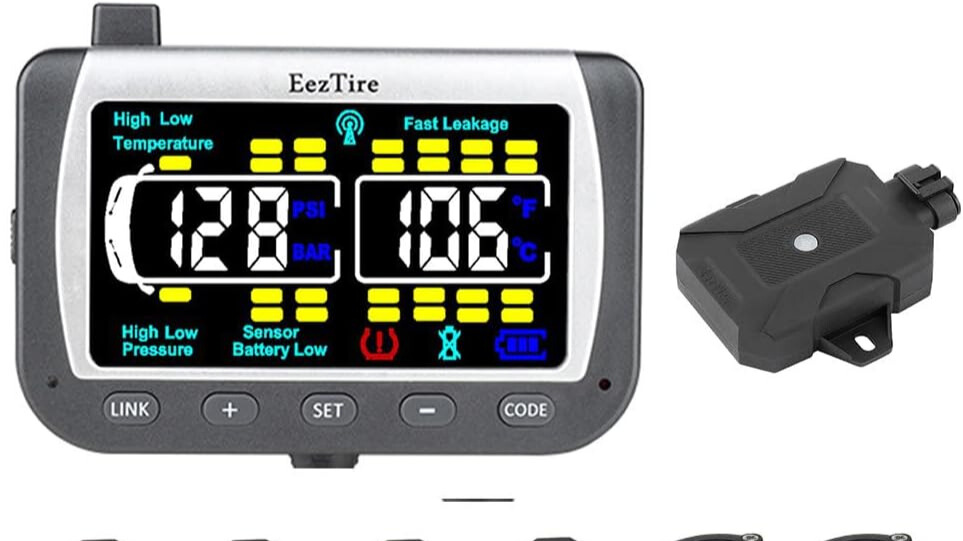
At its core, this is an external-sensor, real-time monitoring system: sensors live on the valve stems and transmit data to an in-cab monitor.
That design matters, because external sensors are convenient—but they also add hardware at the wheel, which introduces the two most common real-world variables I saw:
- fitment/sealing at the valve stem
- signal consistency from far-away tires back to the display
A couple of common misconceptions I kept seeing behind negative reviews:
- Misconception #1: “A TPMS replaces tire checks.”
It doesn’t. It’s a warning layer. You still want a baseline inspection routine, especially before travel days. For a solid safety baseline, NHTSA’s guidance on tire inspection and TPMS warning behavior is a good reference point. - Misconception #2: “If it’s installed, it will always warn in time.”
Owners have both success stories (early leak alerts) and failure stories (no warning before a major incident). A TPMS depends on sensors transmitting, staying attached, and the system recognizing abnormal change—so setup quality matters. - Misconception #3: “Range is universal.”
Owners are very split here. Some report stable readings even on longer combinations, others end up needing a booster/repeater to stop rear tires from dropping out.
If you’re building out a broader safety stack (not just tires), our RV safety gear hub is where I’d start layering the basics.
Key Specs That Actually Matter for RVers
I’m not going to regurgitate a spec sheet here—what matters is what changes outcomes in real RV use.
- Sensor style (flow-through vs cap-style/anti-theft style)
Owners repeatedly describe flow-through as convenient for topping off air, but it can create clearance and sealing challenges depending on wheels and valve stems. - Monitor usability (readability + beeping behavior + wake/sleep behavior)
A bunch of owner frustration isn’t about “accuracy,” it’s about how the monitor behaves: reconnect time, how it alerts, and how easy it is to silence/reset. - Signal pathway (monitor location + metal interference + booster option)
Many real-world issues are “radio + RV construction” problems, not necessarily sensor failures. Placement and booster use show up constantly. - Alert configurability
Owners often mention setting high/low thresholds. The value here is simple: your rig and tires aren’t “generic,” so being able to tune alerts matters. - Serviceability (sensor battery/contact behavior + replacements)
Some owners describe long stretches of smooth use; others report replacing sensors over time or dealing with battery/contact quirks.
If you want the full framework for matching those factors to your specific rig (motorhome vs fifth wheel vs tow vehicle + trailer), the RV TPMS fitment + buying guide lays that out without turning this review into a duplicate buying guide.
Feature-by-Feature Breakdown (Truth vs Marketing)
| Feature | What the Manufacturer Says | What It Actually Means (User Experience) | Compared to Competitors |
|---|---|---|---|
| Real-time pressure + temperature monitoring | You can monitor tires continuously and get alerts | Many owners love the “always visible” aspect; several report it helps catch leaks early. Others say the value drops fast if signals drop out or sensors don’t seal cleanly. | Similar promise across most RV TPMS kits; the differentiator becomes signal stability and sensor/valve compatibility. |
| Flow-through sensor convenience | Add air without removing sensors | Some owners find this genuinely convenient. Others say tight wheel access, extenders, or sealing issues can turn “convenient” into “annoying.” | Flow-through is common, but it’s also the style most sensitive to stems/clearance. |
| Anti-theft locking hardware | Reduces theft risk | Owners are skeptical of theft prevention. A bigger theme: the lock hardware can be fiddly—especially on duals—and can complicate airing up. | Many systems offer lock collars; in practice, owners treat it as “deterrent at best.” |
| Long-range reception / optional booster | Works across longer rigs | This is one of the most polarizing themes. Some owners never need a booster; others say a booster is the difference between stable readings and frequent dropouts. | Most competitors in this category face the same physics; the “win” is whichever setup is easiest to stabilize on your rig. |
| Setup simplicity | Quick install and programming | A lot of owners do find it straightforward once they understand the sequence. But “sequence” matters—sleeping sensors, pairing order, and placement mistakes drive many low ratings. | This isn’t unique—most TPMS systems have a learning curve. The best ones have clearer instructions and fewer “gotchas.” |
Real-World Owner Experience (Deep Pattern Analysis)
Pattern 1: “It bought me time” (the best-case TPMS outcome)
In a nutshell: Owners commonly report the system gave them an early warning—often a leak alarm—before the situation became expensive.
Hidden strength:
It changes your behavior. Instead of “drive until the next stop,” you can react faster: pull off, assess, and avoid chewing up a tire/rim.
Hidden weakness:
A few owners report situations where they didn’t get the warning they expected. In those stories, it’s not always clear whether the sensor stayed intact/communicating at the moment it mattered—but the takeaway is simple: don’t treat any TPMS as infallible.
What to do about it (safe, practical):
- Keep your pre-trip tire routine. TPMS is a layer, not the foundation.
- Use a gauge for baseline checks; NHTSA’s reminder about checking pressure when tires are “cold” is worth following: NHTSA tire pressure guidance.
Pattern 2: Signal stability is highly rig-dependent (and “booster reality” is real)
In a nutshell: Some owners report stable readings across all tires. Others describe rear tires dropping out, needing restarts, or waiting for readings to populate—especially on longer combinations or when towing.
Hidden strength:
When the signal path is clean (monitor placement works, interference is minimal), owners describe it as “quietly reliable.”
Hidden weakness:
When the signal path is not clean, the experience can feel like babysitting: reconnects, missing tires, and extra steps that defeat the point of “set it and forget it.”
What to do about it (safe, practical):
- Treat placement as part of installation (not an afterthought). Metal and distance matter.
- If you add a booster/repeater, route and mount it cleanly—verify against the manufacturer instructions or consult a qualified RV tech/electrician if you’re unsure about routing or power connections.
Pattern 3: Flow-through sensors are convenient… until stems/extenders fight you
In a nutshell: Owners like the concept: add air without removing sensors. But the real world includes dual wheels, awkward angles, and valve stems that don’t always behave nicely with extra hardware.
Hidden strength:
For easy-access wheels, owners describe a smoother “top off and go” routine.
Hidden weakness:
A repeated complaint is air leakage or difficulty airing up—often tied to extenders, valve cores, or sealing surfaces. Some owners also mention worrying about flow-through sensors sticking out far enough to be vulnerable to curbs or road debris.
What to do about it (safe, practical):
- After install, do a leak check (soapy water is the classic simple method).
- If you’re mixing sensors with extenders or tight dual setups, consider having a tire shop sanity-check your stem setup—this is cheap insurance.
Pattern 4: The “anti-theft” hardware is more hassle than protection (for many people)
In a nutshell: Owners repeatedly question how theft-proof the system really is. The bigger story: lock collars and tiny tools can be annoying—especially when you’re trying to air up quickly.
Hidden strength:
Some owners like having something that deters casual tampering.
Hidden weakness:
Several mention losing air during install or struggling with the locking process—particularly on hard-to-access tires.
What to do about it (safe, practical):
- If you’re the type who checks pressure often, consider skipping the lock hardware unless you truly need it.
- If you do use it, set yourself up for success: pre-stage tools and practice once at home, not at a campground exit lane.
Pattern 5: Long-term ownership is mixed (some “years of use,” some sensor replacements)
In a nutshell: There are owners who report running the system for a long time with minimal drama. There are also owners who describe replacing sensors, dealing with display quirks, or fighting warranty/support outcomes.
Hidden strength:
When the system is stable, owners sound loyal. They talk about peace of mind and repeat use on future trips.
Hidden weakness:
When components fail—or when support interactions go poorly—owners tend to be done with the brand entirely.
What to do about it (safe, practical):
- Use your return window aggressively (I’ll show you what to do in a section below).
- Keep your kit organized (tools, spare seals if included, charging cable) so you’re not improvising later.
The Good, The Bad & The Ugly (Pros/Cons)
The Good
- Meaningful early warnings show up repeatedly (especially leak-type alerts that prompt quick action).
- “Always visible” monitoring helps reduce guesswork, especially when towing.
- Flow-through convenience (for the right wheels/stems) is a genuine quality-of-life improvement.
- Some owners praise support responsiveness during setup troubleshooting.
The Bad
- Signal dropouts / missing tire readings are a recurring theme on certain rigs and layouts.
- Setup learning curve: pairing/programming steps matter, and some owners say the instructions don’t prevent common mistakes.
- Lock hardware frustration: tools, collars, and the “airing up” workflow can be irritating.
The Ugly
- A minority-but-serious pattern: a few owners report not getting the warning they expected before a major tire incident.
- Leak/fitment edge cases: extenders + flow-through sensors can create a “safety tool that introduces a leak,” which is the worst possible outcome if you don’t catch it quickly.
- Support/warranty experiences are inconsistent in owner reports—some feel helped, others feel stonewalled.
Mini Toolkit: Decide + Fix (Fast)
Issue-Tag Box (mini)
- #RearTiresDropOut — readings vanish or take a while to appear
- #BoosterMaybeRequired — stable only after adding/repositioning a repeater
- #FlowThroughLeakRisk — leakage after install, often tied to stems/extenders
- #LockHardwareHassle — collars/tools slow down airing up
- #MonitorBeepFatigue — alerts/reset behavior frustrates some owners
- #RandomSensorFailure — replacement over time mentioned by some owners
Fitment/Adapter Mini-Matrix
| Your situation | What owners often run into | Best “safe-first” move |
|---|---|---|
| Longer rig + towing (rear tires far from cab) | Dropouts or delayed readings unless the signal path is optimized | Plan for careful monitor placement; consider a booster if rear tires are inconsistent |
| Dual rear wheels / tight access | Lock collars and airing up can be frustrating | Decide upfront if you’ll use the anti-theft hardware; practice at home first |
| Flow-through sensors + extenders | Increased chance of leaks or awkward inflation | Leak-check every sensor after install; have a tire shop validate stem/valve setup if unsure |
Mini Decision Tree
- If rear tires drop out, then move the monitor to a more signal-friendly spot before buying anything.
- If dropouts persist, then add/activate a booster (and mount it where it actually “sees” the tires).
- If a sensor reads weird or won’t sync, then wake it (movement) + re-pair before assuming it’s dead.
- If you hear leaks after install, then remove sensor, inspect seal/valve core, re-seat carefully, then re-check with soapy water.
- If the system is “noisy” with alerts, then revisit thresholds and confirm your baseline pressures with a gauge.
Troubleshooting Quickflow
- Confirm the monitor is powered and not in a weird sleep state (some owners report wake/sleep behavior can confuse troubleshooting).
- Wake/re-seat the sensor (movement and re-threading fixes “no reading” for some owners).
- Check for a slow leak at the stem/sensor interface using soapy water.
- Verify baseline pressure with a trusted gauge and make sure your thresholds aren’t set too tight.
- Optimize placement (monitor location first, booster next if needed).
- If you’re still stuck, contact support—but document what you tried so the interaction stays efficient.
For a deeper compatibility walk-through (sensor types, booster logic, and stem considerations), here’s the broader RV TPMS selection and setup guide.
Mini Return-Window Reality Check
- Install and confirm you get stable readings from every tire position you plan to monitor (including the farthest/toughest one).
- Do a leak check at every sensor after installation—this is non-negotiable.
- Drive locally and watch for dropouts or delayed readings before trusting it on a travel day.
- Practice your air-up workflow (especially if using lock hardware or duals) so you’re not learning on the road.
- Confirm the monitor’s alert behavior matches what you consider actionable (and that you can silence/reset it quickly).
Installation / Setup Tips (RV-Realistic)
- Pair/program before final mounting if you can—owners often find “bench setup” reduces frustration.
- Mount the monitor where it’s easy to glance at without blocking your view (safety first).
- If readings are inconsistent, move the monitor before assuming the system is defective—metal and layout matter.
- When threading sensors, go slow and stay square to avoid cross-threading.
- If your kit includes lock hardware, back the locking screw/collar out before threading the sensor (many install headaches start here).
- After installing each sensor, do a quick leak check (soapy water is simple and effective).
- If you use extenders, expect extra sensitivity: extender + sensor stacking is where owners report the most leaks.
- If you add a booster/repeater, mount it thoughtfully and keep wiring tidy—verify against manufacturer instructions or consult a qualified RV tech/electrician if routing/power is unclear.
- Charge habits matter: some owners describe better day-to-day experience when they treat the monitor like a device that needs occasional top-offs.
- Before a big trip, do one “dry run” drive and confirm all tires populate quickly and stay connected.
See It in Action: Visual Reality Check
Specs are nice, but seeing a TPMS installed and used in a real RV environment is better. This helps you judge mounting, sensor workflow, and whether the alert behavior would annoy you.
What to look for in this video (based on owner patterns):
- 📺 Screen/Glance Check: Is the display readable from a normal driving posture, or does it demand too much attention?
- 🧲 Mount Check: Does the mount look stable, or does it seem like it would fall off over bumps (a complaint some owners raise with mounts)?
- 🧰 Sensor Install Workflow: Notice how easy (or fiddly) it looks to thread sensors on without losing air.
- 🛞 Dual/Tight Access Reality: If the video shows tight wheel access, watch how much hand room you really need.
- 📶 Signal Reality: Do they demonstrate consistent readings from the farthest tires, or do they gloss over dropouts?
- 🔔 Alarm Behavior: Listen for how aggressive alerts are and how quickly they can be silenced/reset.
Keep in mind this video shows the initial setup, but it won’t show the intermittent dropouts or sensor failures that some owners report later.
Owner Stories
The stories below are composite scenarios reflecting repeated patterns across owner feedback.
Story 1: The “saved my trip” slow-leak catch
You’re rolling into the last stretch of a travel day. Nothing feels wrong, but you notice one tire is trending down. It’s not dramatic yet—just enough to make you pull over early, find the leak, and fix it before it becomes a shredded-tire situation.
Story 2: The “it worked… after I stopped fighting the install”
You install the system, but the farthest tires keep dropping out. You move the monitor, adjust where the signal path is “clean,” and only then does it become the calm, useful dashboard tool you expected—especially when towing.
Story 3: The “I didn’t expect the hardware to change my routine”
You bought flow-through sensors for convenience, but on your wheels the extra hardware makes airing up awkward. You end up refining your process: leak-checking after every reinstall, deciding whether to keep the anti-theft collars on, and treating the system as something that needs a little upkeep—not a one-and-done gadget.
🔎 See more owner feedback on Amazon
Who This Is For (and Who Should Skip It)
Buy it if…
- You want continuous visibility into tire pressure/temperature instead of relying on walkarounds alone.
- You’re willing to spend one focused session getting setup right (pairing, placement, leak checks).
- Your rig benefits from a TPMS most: towing, duals, or anything where tires are hard to visually monitor.
- You like the idea of flow-through convenience and your wheel/stem setup supports it cleanly.
- You’re okay with potentially adding a booster if your rig proves it needs one.
Skip it if…
- You’ll be furious if any tire ever shows “no signal” occasionally.
- You want a system that feels bulletproof without placement optimization.
- Your valve stem/extender setup is already finicky and you don’t want additional hardware at the stem.
- You hate small tools/lock hardware and don’t want anything slowing down airing up.
- You’d rather start by comparing multiple systems side-by-side first.
👉 Check today’s price on Amazon
If you’re comparing options, start here: Top RV TPMS Picks
Alternatives (Quick Comparisons)
I’m not linking out to a shopping rabbit hole here—just framing the common “better fit” scenarios owners tend to bump into.
- If you want fewer external stem variables: consider a TPMS approach that minimizes bulky external hardware (often less convenient, sometimes cleaner fitment).
- If you prioritize long-combination signal stability: look for systems owners consistently describe as stable on long rigs without needing a booster (or with a booster that’s easy to integrate).
- If you hate lock collars and tiny tools: choose a setup that keeps daily pressure checks and airing up simple.
- If you want the simplest learning curve: prioritize systems with the clearest “first hour” setup experience and fewer reports of pairing confusion.
(And yes—the quickest way to compare these tradeoffs is still the Top RV TPMS Picks list.)
Deep-Dive FAQ
What should I test immediately after delivery?
- Confirm the monitor powers on, charges, and is readable where you plan to mount it.
- Pair and verify every sensor produces a stable reading (especially the farthest tires).
- Install sensors and do a leak check at every valve stem connection before any real trip.
- Do a short local drive to confirm you don’t get persistent dropouts.
What are the most common problems and fixes?
Based on aggregated owner experiences, the repeats are:
- Dropouts / missing tires: fix with placement first, booster second.
- Pairing confusion: re-pair with the correct sequence and make sure sensors are awake.
- Leaks after install: remove/re-seat, inspect sealing surfaces/valve core behavior, and leak-check again.
- Alert annoyance: revisit thresholds and confirm baseline pressure with a gauge.
Will this work with my RV setup?
Likely yes if you respect the two big variables:
- Your distance/interference profile (how hard it is to transmit from far tires to the cab).
- Your valve stem/clearance reality (especially with flow-through sensors, extenders, and duals).
If you want the compatibility walkthrough in plain English, use this RV TPMS fitment + setup guide.
Do I still need to check tire pressure manually?
Yes. TPMS is a warning tool, not a replacement for baseline maintenance. NHTSA’s reminder to check pressure on “cold” tires is a good baseline habit: NHTSA tire pressure guidance.
Why do some owners say a TPMS can miss a major incident?
A TPMS depends on sensors transmitting and staying attached. If a sensor stops communicating, is damaged, or a failure happens in a way the system can’t interpret fast enough, the warning may not come as expected. (This is one reason I treat TPMS as a layer, not the whole plan.) For background on how TPMS sensors commonly transmit data, NHTSA’s crash stats report is helpful context: NHTSA TPMS effectiveness overview.
Is “beeping” a sign the system is bad?
Not necessarily. Owners describe both genuine alerts (useful) and alert fatigue (annoying). The difference is usually:
- thresholds set too tight for your real-world conditions, or
- intermittent signal/awake state issues causing repeated warnings.
Should I use the anti-theft locking hardware?
If you rarely air up and you want a deterrent, you might. If you check pressure often or have tight valve access, many owners find the lock hardware slows them down and adds frustration.
Final Verdict
After digging through owner feedback across a long time window, my take is this:
The EEZTire TPMS12MixCB can be a genuinely useful RV safety upgrade when your setup is compatible and your signal path is stable. Owners repeatedly describe the best-case outcome—catching a leak early and avoiding bigger damage—and that’s exactly why TPMS exists.
Where it stumbles is predictable: range/placement sensitivity, flow-through + stem/extender edge cases, and hardware workflow friction (especially lock collars). If you’re willing to treat setup as a real “project” for an hour—and you validate it hard during your return window—it has a strong chance of becoming the quiet, confidence-boosting tool owners love.