ANNTLENT Cell Phone Booster for RV Review: Real-World Results, Install Tips, and the Limits Nobody Mentions
Affiliate Disclaimer: This article contains affiliate links. If you click through and make a purchase, I may earn a small commission at no extra cost to you. This helps support my deep-dive research.
If you’ve ever pulled into a gorgeous campsite… and immediately realized your phone just became a fancy camera, you already know the pain. Dropped calls, texts that hang forever, and “one bar” that lies to your face the moment you press “dial.”
So I did the unglamorous work: I went through 200+ real owner reviews for the ANNTLENT cell phone booster for RV (model N30-PY) and mapped the repeat patterns—what works, what fails, and what people wish they knew before drilling holes or running coax.
Quick Summary (TL;DR)
- The ANNTLENT cell phone booster for RV can be a legit “dead-zone fixer” when you have at least some usable signal outside (even if it’s weak).
- Most wins look like: fewer dropped calls + more consistent LTE/5G data near the indoor antenna—not magical whole-RV coverage.
- Biggest “it doesn’t work” cases usually trace to wrong bands/carrier expectations, poor antenna placement, or truly zero donor signal.
Confidence Score: 7.6/10 (high upside if you install it correctly; real compatibility/setup gotchas)
If you want to check current pricing: See the ANNTLENT booster on Amazon
Spec Snapshot (What You’re Really Buying)
| Item | Reality in plain English |
|---|---|
| Booster type | Best suited for parked RVs, cabins, rural homes, and metal buildings (not a “set-and-forget while driving” solution for most people) |
| Outdoor antenna | Typically a directional antenna style—works best when aimed correctly |
| Indoor coverage | Often one main zone (dinette/desk/bed area) rather than an entire rig end-to-end |
| Core skill required | Basic DIY routing + mounting + “aim and test” patience |
| Biggest risk | Carrier band compatibility and “expectations mismatch” |
Before We Get Deep: What This Booster Is (and Isn’t)
Let’s make this painfully clear, because it explains most of the 1-star reviews:
A booster can’t create signal out of thin air
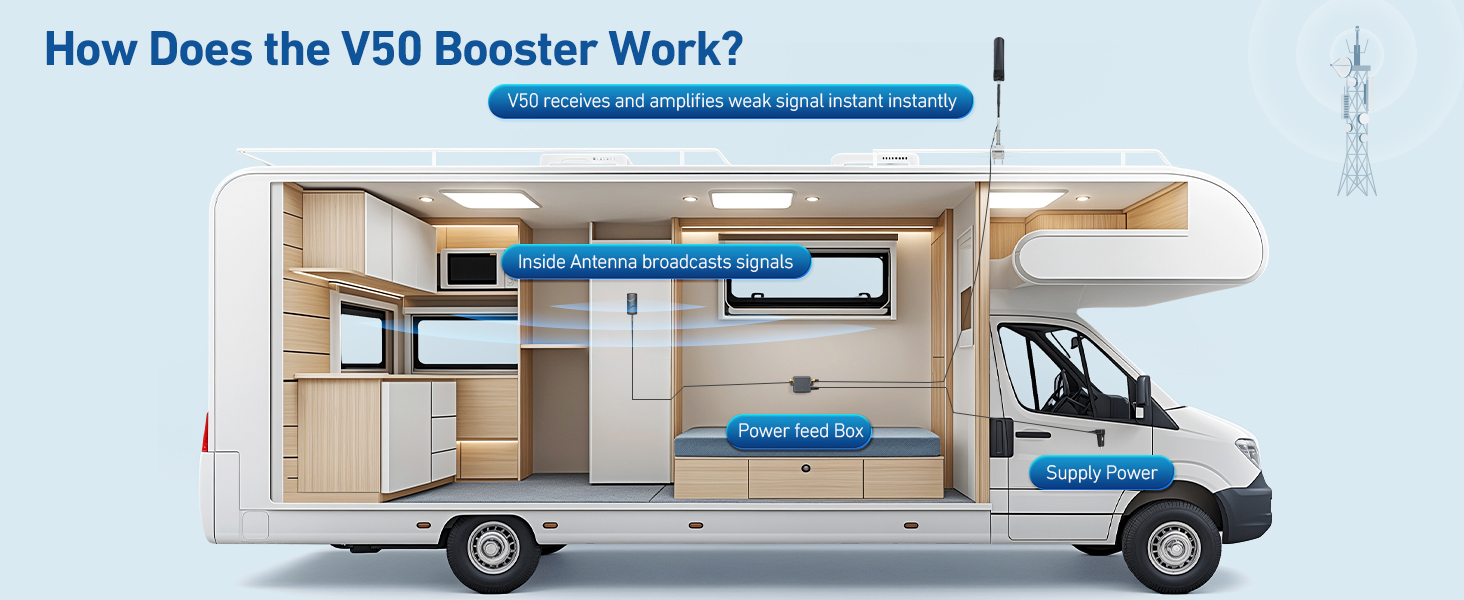
A cell booster is basically a smart repeater:
- The outside antenna grabs whatever signal exists outside (even if it’s weak).
- The amplifier boosts it.
- The inside antenna rebroadcasts it inside your RV/home.
If the outside antenna sees nothing usable, the inside antenna has nothing meaningful to rebroadcast. In the reviews, the happiest owners were usually the ones who started with weak-but-present service outdoors and wanted it to become reliable indoors.
Coverage claims don’t match RV reality
A lot of owners talked about marketing-style coverage numbers (square footage). Real life is messier:
- RV walls/foil insulation/metal skins can block signal
- Antenna separation rules matter
- Indoor antenna placement is everything
So expect a strong bubble near the indoor antenna, not a miracle “whole property” upgrade.
Technical Deep Dive (Friendly, Not Nerdy): Why Placement Beats “Bars”
Bars are a vibe, not a measurement
Multiple reviewers described having “bars” but still getting laggy data or failed calls. That tracks: bars are a simplified indicator.
If you want a more honest read:
- iPhone users often use Field Test Mode (several owners mentioned doing this)
- Android users may use a signal info screen/app to see real signal metrics
Practical takeaway: Don’t tune your install by eyeballing bars alone. Tune it by call stability + consistent data + repeatable results in your “work spot” inside the RV.
Why antenna separation keeps showing up in reviews
Owners repeatedly emphasized keeping the outdoor and indoor antennas far apart—because if they “hear” each other, you get feedback (oscillation). Best case: the booster throttles down. Worst case: performance tanks.
In multiple reviews, people said the system worked noticeably better after they improved:
- distance between antennas
- roof height for the outdoor antenna
- direction/aim toward the tower
This is one reason I consider the ANNTLENT cell phone booster for RV a “DIY win” product: it rewards careful setup.
Key Features (Benefit-Driven & Comparative)
Here’s the “manufacturer promise vs. real user meaning” breakdown—based on repeated patterns in owner feedback.
| Feature | What the listing implies | What it actually means (user experience) | Compared to competitors |
|---|---|---|---|
| “Works for RVs / rural areas” | Stronger signal anywhere | Works best for parked RVs/cabins with at least some outside signal | Premium mobile-focused boosters can be more forgiving, but cost more |
| Directional outdoor antenna | Better reach | Often the make-or-break part: aim it right and you win; aim it wrong and you blame the booster | Directional antennas can outperform omni antennas in fixed/parked installs |
| Coverage claims (sq ft) | Whole rig + then some | Many owners effectively “light up” one main living zone near the indoor antenna | Most boosters behave similarly—indoor antenna placement matters most |
| Multi-carrier promise | Boosts Verizon/AT&T/T-Mobile | Mixed results: some report great outcomes; others hit band compatibility limits (especially depending on area/tower bands) | Higher-end units often have clearer band support and stronger support ecosystems |
| DIY install kit | Easy setup | Indoor setup is usually straightforward; roof antenna mounting + cable routing is the hard part | Similar across most kits—install quality determines results |
Installation Walkthrough (What Owners Actually Did)
I’m going to give you the “review-tested” version—not the fantasy version.
Step-by-step setup (parked RV or stationary use)
- Pick your indoor “signal zone” first
Choose where you need signal: dinette workstation, bed, or driver’s seat (if you work from the cab while parked). - Mount the indoor antenna to serve that zone
Owners who placed the indoor antenna centrally—but still close to their use area—tended to report the biggest improvement. - Plan cable routing before you mount anything outside
Look for existing paths: fridge vent area, utility chases, cabinet corners, or any pre-existing access ports.
Pro installs look “boring.” Boring is good. - Mount the outdoor antenna as high and clear as possible
A consistent pattern: higher mounting (and away from obstructions) improved results.
Several RVers described mounting near the roofline and aiming the antenna toward a known tower direction. - Create real separation between antennas
Don’t cheat this step. Owners repeatedly referenced large separation targets and reported better stability once they achieved more distance. - Power on, then test methodically
Test calls + texts + data at:- your indoor “work spot”
- a few feet away
- another room/area (to understand realistic coverage)
- Aim the antenna, then retest
Rotate/aim in small increments, give the booster time to settle, then retest.
This step is where many “it doesn’t work” installs become “oh wow… it works.”
Electrical safety note (worth doing)
Because this is one more device on your rig’s power ecosystem, protect it like you would your other electronics:
- RV Surge Protectors 101: Safeguarding Your RV’s Electrical System
- RV Electrical Safety Tips: Avoiding Fires, Shocks & Power Damage
Real User Experience Analysis (Deep Pattern Breakdown)
Here’s what stood out most across the review set.
Pattern #1: “Easy… except the outdoor antenna”
A large portion of owners described setup as straightforward until they reached the outdoor antenna step. The pain points weren’t mysterious—they were normal DIY friction:
- deciding where to mount on the roofline
- getting the cable inside neatly
- figuring out a good aim direction
- learning the separation rule the hard way
What this means for you: If you’re comfortable doing basic RV routing and mounting, you’ll likely be fine. If you hate anything involving ladders, drilling, or cable management, budget for help.
Pattern #2: Most “wins” are stability, not speed records
When owners were happy, it was usually because:
- calls stopped dropping
- texting became reliable
- LTE/5G became consistent enough to use day-to-day
A few owners mentioned speed tests, but the bigger story was reliability. That’s exactly what a booster is best at: turning “almost usable” into “actually usable.”
Pattern #3: “It works… in the right spot”
Even among positive reviews, there’s a recurring truth: performance concentrates around the indoor antenna. Many owners effectively created a “signal oasis” in a living room, office corner, or RV dinette—then accepted weaker performance farther away.
This is normal. It’s also why I recommend you plan your “signal zone” first.
Pattern #4: Carrier/band confusion creates a lot of unnecessary returns
A notable number of reviews talked about needing to understand:
- which carrier you’re on
- which bands are common in your area
- whether your phone/tower pairing is even boostable by your specific model
Some buyers discovered (too late) that their location relied heavily on bands their setup didn’t help much with—leading to “no improvement” experiences and returns.
This is the #1 mismatch problem in the entire category.
If you’re ready to roll the dice—but do it smart: See the ANNTLENT booster on Amazon
The Good, The Bad & The Ugly (Pros/Cons You Can Trust)
Based on the review distribution and repeated themes (roughly half 4–5 star, about a third 1–2 star, and the rest mixed):
The Good (what owners repeatedly liked)
- Noticeable improvement from weak signal to usable signal in rural settings (the classic “1 bar outside → workable inside” story)
- Better call stability and fewer dropped calls for many users
- DIY-friendly indoor setup (mounting the indoor antenna and placing the booster unit)
- Strong value perception when it worked—several owners framed it as “cheaper than the premium brands” but effective in the right use case
The Bad (honest drawbacks)
- Outdoor antenna mounting is the hardest part (and a common source of frustration)
- Coverage expectations get crushed if you assume whole-RV coverage without careful indoor antenna placement
- Compatibility confusion (bands/carriers) drives a lot of “it didn’t work” outcomes
- Instructions/documentation quality came up repeatedly as something buyers had to work around
The Ugly (the stuff that triggers 1-star rage)
- “No improvement” after hours of setup (often tied to aim/separation/signal reality)
- Returns/exchanges due to mismatched expectations or package issues
- A few long-term complaints about components/cables/connectors not aging as gracefully as premium setups
Owner Stories (The Human Side)
These are not quotes—these are the real-life scenarios that showed up again and again in the Amazon review feedback.
Story 1: The rural home / parked RV “work-from-anywhere” rescue
One common pattern: an owner starts with barely usable service—calls break up, texts fail, and anything with photos is painful. After installing and aiming the antenna, the change isn’t “perfect everywhere,” but the main living/work spot becomes stable enough to function. The emotional tone in these reviews is consistent: relief.
Story 2: The “I did everything right… why is it still bad?” spiral
Another recurring scenario: someone installs it, follows separation guidance (at least on paper), powers it on, and sees lights that suggest things are fine—yet their phone experience barely changes. In many of these cases, owners ended up learning one of two truths:
- the outdoor antenna wasn’t aimed at a helpful tower/band, or
- the outside signal was simply too weak/too inconsistent to amplify into something meaningful
Story 3: The cautious upgrader replacing an older system
A smaller but valuable set of reviews came from people replacing older boosters. When these buyers were happy, they typically described the ANNTLENT as delivering “enough” performance—sometimes close to what they were used to—at a friendlier price point, with the usual tradeoffs in polish/support.
Expert Tips & Installation Hacks (Review-Sourced “Do This, Not That”)
Here are the pro-level moves that kept showing up—things people learned the hard way:
- Aim first, then mount permanently
Temporarily position the outdoor antenna, test your results, then lock it in. This prevents the classic “I drilled holes and the signal got worse” moment. - Treat the indoor antenna like a lamp, not a Wi-Fi router
You don’t “fill the whole RV.” You light up a zone. Place it where you sit, work, and sleep. - Use real signal info, not bars, while tuning
Several owners mentioned using phone tools/apps to measure signal more honestly. Even if you don’t go full nerd, at least do repeatable tests:- call someone and walk around
- run the same simple webpage load test in the same spots
- repeat after each antenna adjustment
- Don’t ignore cable routing and strain relief
A clean cable run isn’t just aesthetics—it prevents connector damage, accidental yanks, and intermittent issues later.
Who This Is For (and Who Should Skip)
Buy the ANNTLENT cell phone booster for RV if you are…
- A parked RVer who needs reliable calls/text/data at campgrounds with weak signal
- Living/working in a rural home, cabin, or metal-sided building where indoor reception is worse than outside
- Willing to do a real DIY install (mounting + routing + aiming + testing)
Skip it (or rethink your plan) if you are…
- Expecting a booster to work in a true zero-signal area
- Wanting effortless in-motion boosting with no aiming and no setup nuance
- On a carrier/band setup that this model doesn’t meaningfully support in your specific location
- Unwilling to mount an outdoor antenna or manage clean cable routing
If your broader goal is “always-connected RV life,” don’t treat a cell booster as the whole solution. It’s one layer in the stack:
- RV Tech and Connectivity: A Complete Guide to Wi-Fi, GPS, and Backup Cameras
- Best RV Wi-Fi Boosters & Routers (for campsite Wi-Fi and local networks)
Comparison Table: Where ANNTLENT Fits (Reality-Based)
This is intentionally practical—no marketing fluff.
| Option | Best for | Typical upside | Typical downside |
|---|---|---|---|
| ANNTLENT N30-PY | Parked RVs/cabins needing a reliable “signal zone” | Strong value when installed/aimed well | Compatibility + setup nuance can punish you |
| Premium mobile-focused boosters | People who want a more polished ecosystem | Often better support and fewer gotchas | Usually costs significantly more |
| Hotspot/router-only approach | Areas where cellular is already decent | Simple, no roof antenna | Doesn’t fix weak signal; only shares what you already have |
Deep-Dive FAQ (High-Intent Questions)
1) Will this work while driving?
Based on owner language and the antenna/aiming patterns, most success stories read like stationary / parked installs. If your goal is continuous in-motion boosting, you’ll likely want a setup explicitly designed for that use case.
2) Does it boost 5G?
Owners mention LTE and some mention 5G in general conversation. The practical point: many “5G” experiences still fall back to LTE depending on tower and band. Expect the biggest benefit to be reliability more than “5G speed bragging rights.”
3) How much improvement should you expect?
The most common “happy outcome” pattern looks like going from unreliable indoor service to usable indoor service near the indoor antenna. Many people describe a bars increase, but the better metric is: calls stop dropping and data becomes consistent.
4) Why do some people get no improvement even after installing correctly?
Three common causes show up repeatedly:
- the outdoor antenna isn’t aimed at a helpful tower
- antennas are too close (performance throttles)
- the outside signal is too weak/too inconsistent to amplify
5) Can it help multiple phones/carriers at once?
Several reviews discuss different carrier outcomes (e.g., stronger results for one carrier than another). In general, boosters can help multiple devices, but carrier/band reality still determines who benefits most in your exact location.
Final Verdict (No Hype)
The ANNTLENT cell phone booster for RV is one of those products where the ceiling is high—and the floor is brutal.
If you approach it like a real DIY system (plan the zone, mount smart, aim carefully, test methodically), it can absolutely turn a frustrating campsite into a functional one. But if you treat it like a magic box that manufactures signal, you’ll end up in the return pile with the loudest 1-star reviewers.
My bottom line: For parked RVers and rural setups with weak-but-present outside signal, it’s a strong value play—just don’t skip the “aim and separation” fundamentals.