TireMinder i10 RV TPMS Review (2026): Real Owner Patterns, Setup Gotchas, and Who It Fits Best
Last updated: January 2026
- Rechecked the newest owner-reported patterns around signal stability, especially on fifth wheels and longer trailers.
- Updated the most repeated “buyer surprises” (valve stem compatibility, screen readability, mount/charging durability).
- Refreshed setup guidance based on recurring real-world install friction (booster placement, sensor pairing, startup behavior).
Affiliate disclosure: This article contains affiliate links. If you buy through them, we may earn a small commission at no extra cost to you.
Quick Summary
If you want the plain-English takeaway: the TireMinder i10 is widely described as “peace-of-mind” gear that can catch a leak before it becomes a roadside mess—but it has a few recurring pain points you should take seriously (especially valve stems, sunlight readability, and mount/charging durability). For a broader fitment checklist and what to look for across brands, use this: How to choose the right RV TPMS for your towable or motorhome.
Hook Intro
If you tow long enough, you eventually learn the hard way that tire problems don’t always “announce themselves.” Your trailer can be tracking perfectly fine while a tire is quietly bleeding air—until it’s not. That’s the entire reason RVers buy a TPMS (tire pressure monitoring system): you want early warning before you shred a tire, damage a wheel well, or lose hours on the shoulder with traffic blasting by.
The TireMinder i10 RV TPMS gets a lot of love from owners who’ve tried other systems and got burned by dropouts, slow connections, or “info-only” monitors with no meaningful alerts. Across the owner feedback I analyzed, many people describe the i10 as the first system that feels “set it and forget it” once it’s dialed in—especially when the signal booster is mounted in a smart spot.
That said, the same owner feedback also repeats a few sharp warnings: don’t treat valve stem compatibility as optional, don’t assume the windshield mount is secure, and don’t be surprised if sunlight + sunglasses makes the display harder to read than you expected.
How this review was built (so you can trust it)
I analyzed about 150 owner reviews spanning mid-2020 through January 2026, with a heavier concentration in recent years.
Here’s how I approached it:
- I tagged feedback into buckets: performance/alerts, signal stability, setup sensitivity, fitment/compatibility, reliability symptoms, and support/returns.
- I separated likely setup-driven issues (booster location, pairing steps, power wiring choices, startup patience) from likely product failures (monitor charging/backlight issues, repeated sensor failures, abnormal readings that persist).
Important limitations:
- Reviews skew toward extremes (very happy or very frustrated).
- RV setups vary widely (trailer length, tow vehicle, wheel/stem types, where the booster can be mounted).
- I prioritized recurring patterns over one-off experiences—while still calling out repeated “red flag” failures when they show up.
Quick Verdict (TL;DR)
Best for
- RVers towing a travel trailer or fifth wheel who want pressure + temperature at a glance, plus audible warnings.
- People who have tried cheaper systems and keep seeing slow connections or signal dropouts.
- Anyone with a prior blowout story who wants a “heads-up” tool before damage happens.
Not for
- Anyone running rubber valve stems who isn’t willing to upgrade—many owners strongly warn against it.
- RVers who need a display that stays perfectly readable in harsh sun while wearing sunglasses.
- People who get annoyed by systems that can be a bit “fussy” until you learn the startup/pairing rhythm.
Standout win
- Owners repeatedly report fast, confidence-building alerts for real leaks—often early enough to pull over safely and avoid tire destruction.
Watch-outs
- A recurring pain point is monitor mount/charging durability (drops and cracked screens show up repeatedly).
- A minority—but repeated—theme: inconsistent readings or delayed/no-signal behavior that can undermine trust if your setup is finicky.
Confidence Score: 8.3/10 ⭐
What this means (and what it doesn’t):
- This is a buyer-usefulness rating, not a reliability statistic.
- I weighed: (1) real-world safety value of alerts, (2) setup sensitivity and signal stability, (3) valve-stem/fitment risk, (4) monitor durability/charging complaints, and (5) support/parts experience reported by owners.
👉 Check today’s price on Amazon
What This Product Is (and What It Isn’t)
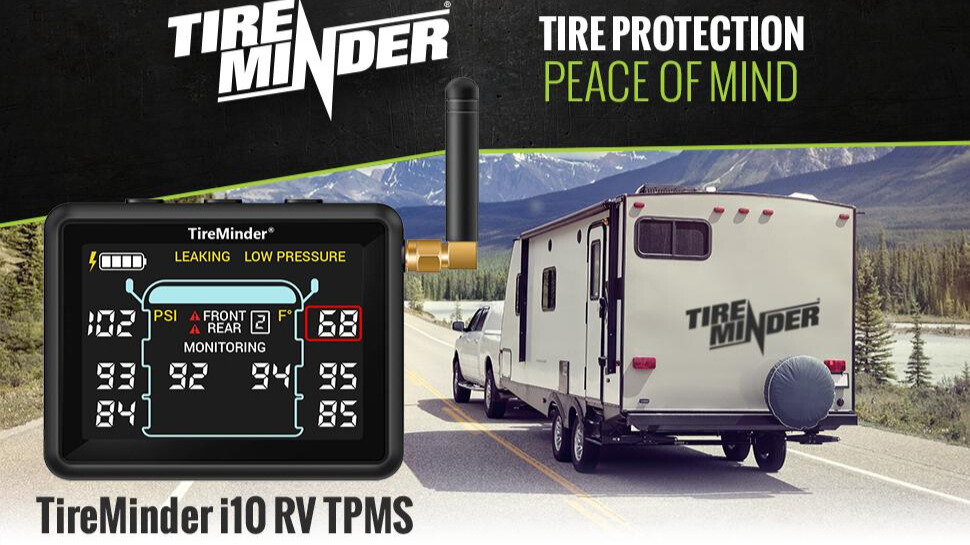
The TireMinder i10 is an external-sensor RV TPMS with a cab monitor and a signal booster (often called a repeater). You screw sensors onto your valve stems, and the monitor displays tire pressure and temperature while you drive.
What it is
- A real-time monitoring and warning tool that many owners say reduces stress and catches leaks early.
- A system that, for many setups, becomes “boring in a good way” once installed properly—meaning it just works.
What it isn’t
- It won’t “prevent” a tire problem by itself. Owners repeatedly describe it as an early warning system—your job is to respond safely when it alerts.
- It’s not automatically “plug-and-play” for every rig. Some people report a smooth install in minutes; others describe setup as more complicated than expected.
Common misconceptions I see owners wrestling with
- “If I buy a premium TPMS, I don’t need to think about valve stems.” In owner feedback, valve stems are a recurring make-or-break factor.
- “No signal is the same as low pressure.” Multiple owners note you need to learn the difference between a true tire event and a connection hiccup.
- “Temperature is always accurate enough to trust.” Some owners love the temp readout; others report big mismatches versus other tools.
Key Specs That Actually Matter for RVers
I’m only calling out details that show up repeatedly in owner experiences—because in real RV use, these are what change outcomes.
- External sensors (screw-on caps):
Owners like the convenience and the ability to replace sensors without dismounting tires—but many warn the sensors add weight and can stress weaker valve stems. - Signal booster/repeater included (and often needed):
On longer rigs, owners commonly report the booster is the difference between “rock solid” and “no signal drama.” - Audible alarms + configurable alert thresholds:
People repeatedly describe catching leaks early because the system alerted fast enough to pull off before a tire shredded. - Monitor readability and mounting security:
Several owners report the display can be hard to see in bright sun (especially with sunglasses), and the mount doesn’t always “lock” in a confidence-inspiring way. - Monitor charging/port experience:
Owners report mixed experiences—some love later units with USB-C, while others report charging/backlight failures or a monitor that won’t hold a charge after storage. - Startup behavior and “time to populate” all tires:
Multiple owners note you may need patience at startup—some describe it taking around five minutes for all tires to show.
Feature-by-Feature Breakdown (Truth vs Marketing)
| Feature | What the Manufacturer Says | What It Actually Means (User Experience) | Compared to Competitors |
|---|---|---|---|
| Pressure + temperature monitoring | Measures pressure and temperature and alerts you to problems | Many owners say it’s a true “peace of mind” tool and catches leaks early; a minority report temp/pressure readings that don’t match other methods | Compared to cheaper systems some owners tried, i10 is often described as more responsive—though not universally |
| Signal booster/repeater | Use a booster to maintain signal (especially on RVs/trailers) | Owners with longer trailers often report the booster is essential; placement matters a lot | Many “budget” systems get criticized for slow connections; i10 + booster is often praised when installed well |
| External sensors | Easy install, no tire dismount | Owners appreciate convenience, but valve stem compatibility becomes a recurring “gotcha” | Internal-sensor systems avoid stem-weight issues, but add service complexity (owners bring this up indirectly) |
| Monitor + mount | Dashboard/windshield display for at-a-glance status | Some love the compact display; others report the mount can let the monitor fall, leading to cracked screens | Compared to app-based systems (owners mention phone reliance), a dedicated monitor is often preferred |
| Add/replace sensors | Sensors can be replaced/added | Owners do add sensors successfully, but replacement sensor cost/availability complaints show up | Some owners say cheaper ecosystems are easier to “just replace” even if less refined |
| Manual/setup guidance | Clear instructions | A standout: multiple owners praise the manual as unusually well-written and beginner-friendly | This is frequently described as better than typical “generic electronics” documentation |
Real-World Owner Experience (Deep Pattern Analysis)
Pattern 1: When the booster is placed well, owners often call it “rock solid”
In a nutshell: A lot of happy owners describe consistent readings and strong signal—especially after they mount the booster thoughtfully.
Hidden strength
- Owners towing fifth wheels and longer travel trailers often report they can keep the monitor in the cab and still get reliable readings—when the booster is mounted in a smart location (commonly near the front of the trailer or under-frame).
Hidden weakness
- A recurring frustration is “random sensors dropping in and out,” especially when the booster placement or power routing isn’t ideal. Rain also shows up as a trigger for false warnings or signal weirdness for some.
What to do about it (safe, practical)
- If you’re getting “no signal” behavior, owners repeatedly report improvement after relocating the booster closer to the sensors and ensuring the power connection is stable. If you’re modifying wiring beyond basic connection checks, verify against the manufacturer instructions or consult a qualified RV tech.
Pattern 2: Valve stems are the biggest real-world “gotcha”
In a nutshell: The i10 can be beloved and still be the wrong fit if your valve stems aren’t up to the job.
Hidden strength
- Owners like that external sensors are quick to install—and that the system can alert fast enough to prevent tire destruction.
Hidden weakness
- Repeated warnings show up about rubber valve stems cracking or leaking, which multiple owners attribute to sensor weight/vibration. Some describe being stranded and replacing stems repeatedly before deciding to stop using the sensors.
What to do about it (safe, practical)
- Many owners strongly recommend metal valve stems. If you’re unsure what you have, have a tire shop verify your stems before installing. That’s especially important if you tow at higher pressures (owners mention this explicitly).
Pattern 3: Display readability and mount durability can make or break daily happiness
In a nutshell: The monitor form factor is praised by some and cursed by others.
Hidden strength
- Owners like a dedicated monitor that’s easy to glance at (and doesn’t require checking a phone). Some also like being able to carry the monitor during a walkaround.
Hidden weakness
- Several owners report it’s hard to see in sunlight—especially with sunglasses. Separately, the “monitor fell and cracked” story repeats across years, including complaints that it doesn’t lock securely into the mount.
What to do about it (safe, practical)
- Treat the mount as a real risk point: mount it where it won’t get bumped, and be careful removing it. Some owners mention wanting a more robust mounting solution.
Pattern 4: Alerts feel “life-saving” in leak scenarios—but false alarms and odd readings do exist
In a nutshell: Many owners describe the i10 paying for itself the first time it catches a leak early. But a minority report false alarms or readings that don’t track reality.
Hidden strength
- Leak detection stories are consistent: alarms triggered early enough to pull over, swap a tire, or reach a tire shop before major damage.
Hidden weakness
- A smaller (but repeated) set of owners describe false “leaking pressure” warnings, pressure jumping around, or temperature readings they consider inaccurate. A few report situations where the display appeared to keep showing “normal” even when they believed something had failed.
What to do about it (safe, practical)
- Treat alerts seriously, but confirm safely when practical (walkaround, gauge check at a stop). If readings behave erratically after battery changes or resets, owners often contact support—results reported range from excellent replacements to frustrating back-and-forth.
Pattern 5: Support experience is polarized—many rave, some rage
In a nutshell: Support is a highlight for many, and a deal-breaker for others.
Hidden strength
- Many owners report quick help, replacements for failed sensors, and surprisingly responsive assistance.
Hidden weakness
- Some report stalled warranty conversations, trouble reaching support, or dissatisfaction with how issues were handled—especially when the system failed after the return window.
What to do about it (safe, practical)
- If you buy, do your setup and early shakedown quickly so you can decide while you still have return options.
The Good, The Bad & The Ugly (Pros/Cons)
Pros (the themes owners repeat)
- Peace-of-mind factor is real: lots of owners say it reduces stress and guesswork.
- Early leak warnings: repeated stories of catching a puncture or pressure drop before tire destruction.
- Strong performance with the booster: many longer-rig owners say signal is reliable when booster placement is right.
- Manual clarity: multiple owners praise the instructions as unusually well-written.
- Dedicated monitor (no phone dependency): owners who hate app-based monitoring call this a win.
Cons (the themes you should not ignore)
- Valve stem risk on rubber stems: repeated warnings and some severe experiences.
- Sunlight readability issues: especially with sunglasses; this comes up often enough to matter.
- Mount/monitor durability: cracked screens and “doesn’t lock” complaints repeat.
- False alarms / inconsistent readings (minority but present): enough to mention, especially if you’re sensitive to alarm fatigue.
- Replacement sensor cost/availability frustration: some owners advise keeping spares if you rely on the system.
Mini Toolkit: Decide + Fix (Fast)
Issue-Tag Box (most common “issue clusters”)
- No-signal / dropouts
- Valve stem leaks or stem cracking concerns
- Sunlight/sunglasses readability
- Mount slip → monitor drops/cracks
- False “leaking pressure” alerts
- Charging/backlight/monitor power issues
Fitment/Adapter Mini-Matrix (max 3 rows)
| Your setup | What owners commonly run into | What tends to work better |
|---|---|---|
| Rubber valve stems | Reports of leaks/cracking and repeat tire shop visits | Owners strongly favor metal valve stems |
| Long fifth wheel / long trailer | Dropouts if the booster isn’t placed well | Booster mounted closer to the trailer (placement experimentation helps) |
| Bright sun + sunglasses | Display can be hard to read | Adjust mounting position; some owners seek alternate mounts |
Mini Decision Tree
- If you have rubber valve stems, treat stem upgrades as a priority before you rely on external sensors.
- If you get repeated no-signal warnings, relocate the booster closer to the trailer and confirm a stable power connection.
- If the monitor is hard to read in sun, change placement first; if it’s still a problem, this may be a poor fit for your driving conditions.
- If you’re seeing pressure/temperature behavior that doesn’t pass a sanity check, pause reliance and troubleshoot/reset or contact support.
- If you want less hassle when adding air, consider a flow-through style sensor option (owners bring this up as a preference).
Troubleshooting Quickflow (max 6 steps)
- No signal / NS: confirm sensors are seated properly and batteries are fresh.
- Verify the booster has stable power (owners mention loose or awkward power connections as a trigger).
- Move the booster location closer to the trailer’s front/under-frame area and re-check stability on a drive.
- False “leaking pressure” alerts: confirm actual pressure at a safe stop; weather/rain is reported as a trigger by some.
- Monitor won’t charge / backlight issues: try a different cable/power source; if it persists, owners often contact support.
- If behavior remains inconsistent after resets/battery changes, escalate to manufacturer support or a qualified RV tech—don’t keep “hoping it’s fine.”
For a broader, brand-agnostic fitment checklist you can use before you commit to any system, reference: RV TPMS buying checklist (fitment + setup sanity checks)
Mini Return-Window Reality Check
- Do a short drive and watch for dropouts—then adjust booster placement if needed.
- Confirm you can read the display in your real driving light conditions (including sunglasses if you wear them).
- Verify alerts make sense by comparing at least once with a trusted gauge at a safe stop.
- Pay attention to valve stem behavior (any new leakage, looseness, or weirdness is a stop-and-check event).
- Handle the monitor like a phone: if your mount feels insecure, treat it as a drop risk and solve it early.
Installation / Setup Tips (RV-Realistic)
- Read the manual end-to-end once; multiple owners say it’s unusually clear and worth following exactly.
- Expect a learning curve on first setup—some owners say they had to restart and then it was “one and done.”
- Be patient on startup; some owners report it can take around five minutes for all tires to display.
- If you tow a longer trailer, assume you’ll likely benefit from the booster—and plan the mounting location early.
- Mount the booster where it’s protected from road debris but still positioned to get signal (owners describe experimenting).
- If you’re changing how the booster is powered (switches, hardwiring, etc.), verify against the manufacturer instructions or consult a qualified RV tech.
- Treat valve stems as part of the system: multiple owners strongly recommend metal valve stems before installing external sensors.
- If you struggle to add air because the sensor and lock hardware complicate access, consider whether flow-through sensors would fit your routine better.
- If you mount the monitor on glass, be cautious removing it—drop stories repeat across owner feedback.
- Do a “cab workflow” test: can you toggle PSI/temp easily without distraction? Owners like top-mounted buttons; others dislike button feel.
- If you store the trailer for a season, consider removing sensors (some owners mention storage habits affecting later behavior).
- If you want a broader safety kit checklist beyond TPMS, start here: Essential RV safety gear checklist
Owner Stories (The Human Side)
The stories below are composite scenarios reflecting repeated patterns across owner feedback.
Story 1: The “nothing felt wrong” leak that got caught early
You’re rolling through rain on a long haul. The trailer feels stable. Then the monitor alarms and you see one tire drifting down. You don’t panic—you slow down, find a safe pull-off, and by the time you stop, you can actually hear air leaking. Instead of a shredded tire and damaged wheel well, it’s a controlled tire change and you’re back on the road.
Story 2: The “why does this keep losing signal?” setup that became stable after one change
At first, you get intermittent no-signal warnings on a couple tires. You replace batteries and re-check sensor seating—still inconsistent. Then you move the booster from the truck area to a spot nearer the trailer’s front/under-frame and suddenly the dropouts stop. From then on, the system becomes background reassurance instead of constant noise.
Story 3: The valve stem surprise that turned into a hard line in the sand
You install the sensors on what you assumed were decent stems. On a drive, you get a low-pressure alert—then find leakage at the stem. After replacing stems and still worrying about repeat issues, you decide you won’t rely on external sensors unless you’re confident the stems are truly up to the task. The TPMS did its job by warning you—but the stem compatibility lesson wasn’t cheap.
🔎 See more owner feedback on Amazon
Who This Is For (and Who Should Skip It)
Buy it if…
- You tow a travel trailer or fifth wheel and want early warnings for pressure changes and heat trends.
- You value a dedicated monitor more than phone-based monitoring.
- You’re willing to place the booster thoughtfully (and tweak it if needed).
- You take valve stems seriously and can verify compatibility before trusting the system.
- You want a system many owners describe as a meaningful upgrade from “cheap” options.
Skip it if…
- You have rubber valve stems and don’t want to change anything.
- You need a display that stays easy to read in harsh sun with sunglasses, no matter what.
- You’re highly sensitive to occasional false alarms or intermittent “no signal” behavior.
- You want the simplest possible install with zero tinkering.
👉 Check today’s price on Amazon
If you’re comparing options, start here: Top RV TPMS Picks
Alternatives (Quick Comparisons)
No external links here—just the “type” comparisons owners implicitly reference.
- Flow-through sensor style (within the same general ecosystem):
Some owners say they’d choose flow-through next time because topping off air can be less annoying. - Budget cap-style TPMS systems:
Several owners who upgraded to TireMinder did so after budget systems had slow connections, inconsistent updates, or early failures. The trade-off is cost. - App/phone-based systems (or OEM-style setups):
Owners who dislike checking a phone tend to prefer the i10’s dedicated monitor. If you prefer app integration, a monitor-only product may feel old-school.
Deep-Dive FAQ (High-Intent)
Will this work with my RV setup?
It often does—but owner feedback suggests your best predictor is valve stem type and whether you can place the booster in a stable, sensible location. Long trailers commonly benefit from the booster being mounted closer to the trailer rather than relying on the tow vehicle area.
What are the most common problems and fixes?
The most repeated themes are: no-signal/dropouts, valve stem leaks/cracking concerns, sunlight readability, mount-related drops, and occasional false alerts. Fixes usually start with basics: batteries seated correctly, re-pairing, booster placement changes, and verifying the power connection is stable.
What should I test immediately after delivery?
- Confirm you can complete pairing and see all tires populate (expect some owners report a wait at startup).
- Do a short drive and watch for dropouts.
- Check that you can read the display in your real lighting conditions.
- Validate at least once against a trusted gauge at a safe stop.
- Watch valve stems closely for any new leakage behavior after installing sensors.
Does the booster really matter?
For many owners—especially on fifth wheels and longer trailers—yes. A recurring pattern is “it became reliable once the booster was in the right place.”
Is the temperature reading trustworthy?
Owner feedback is mixed. Many treat it as a useful trend indicator; a minority report big mismatches compared to other tools or built-in systems. If temperature accuracy is your primary reason for buying, pay extra attention during your early validation.
Do I need metal valve stems?
Based on repeated owner warnings and multiple negative experiences tied to rubber stems, many owners treat metal stems as the safer default before relying on external sensors.
Final Verdict
If your goal is simple—get earlier warning on tire problems before they become expensive or dangerous—the TireMinder i10 earns a lot of real-world praise, especially from owners who’ve already been burned by unreliable systems. When the booster is mounted well and your valve stems are truly compatible, owners frequently describe it as a “stress reducer” that becomes part of their standard towing routine.
But I would not brush off the repeated complaints: valve stem compatibility is a serious consideration, the display/mount can be a weak point, and a minority of owners report trust-eroding odd readings. If those risks match your situation, you may be happier with a different style of TPMS.