HiBoost Travel 3.0 RV Review: Real-World Results From Full-Timers, Weekend Campers, and Remote Workers
Affiliate Disclaimer: This article contains affiliate links. If you click through and make a purchase, I may earn a small commission at no extra cost to you. This helps support my deep-dive research.
Why Most “Campground Internet Fixes” Fail
If you’ve ever pulled into a gorgeous campsite… then watched your phone drop into one bar (or “SOS”) the second you step inside your RV, you already know the pain:
- Hotspot won’t authenticate or crawls
- Calls break up mid-sentence
- Web pages stall out
- You start doing the “walk around holding the phone in the air” routine like it’s a ritual
I went through a large batch of Amazon owner reports to figure out what the HiBoost Power Travel 3.0 RV Cellular Booster actually does in real camping life—especially for working remotely, streaming, and basic safety communications—so you don’t waste money on the wrong expectations. reviews
Quick Summary
- The HiBoost Travel 3.0 is best thought of as a “make weak service usable” tool—not a “create service from nothing” tool.
- Owner patterns strongly suggest it shines when you can start with at least a faint, intermittent signal outside the rig.
- The biggest “gotcha” is coverage area: many owners only see the best gains within a few feet of the indoor antenna, so setup strategy matters.
If you’re building a complete connectivity stack (cell + router + Wi-Fi), also see:
- RV Tech and Connectivity: A Complete Guide
- Peplink Router for RV Internet
- Best RV Wi-Fi Boosters & Routers
Quick Verdict (TL;DR)
- For most buyers, this RV cell phone booster delivers a meaningful “step up” in reliability (calls/text + usable hotspot) when you’re living in the 0–1 bar world.
- The indoor coverage “bubble” is often small—plan on placing your phone/hotspot near the inside antenna for best results.
- Customer support is a recurring bright spot in owner reports (especially troubleshooting and replacement parts).
Confidence Score: 8.4/10 (strong performance patterns, but not universal—band/carrier/site limitations are real)
If you want to check current pricing and availability:
What You’re Actually Buying
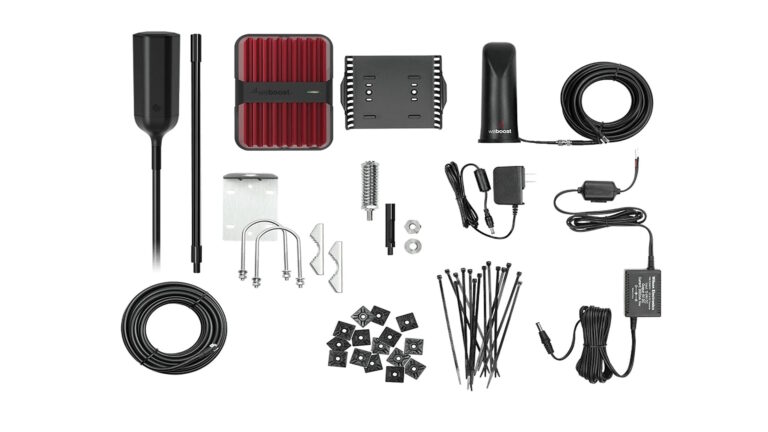
A mobile cellular booster kit like this typically includes:
- Outdoor antenna (captures the best signal available outside)
- Booster amplifier (increases usable signal level—within regulatory limits)
- Indoor antenna (rebroadcasts the boosted signal into a small area inside your RV)
In real life, the magic isn’t “more bars.” The magic is usually:
- Your phone stops falling off data every 30 seconds
- Hotspot becomes stable enough for Teams/Zoom and basic work
- Streaming goes from “buffer city” to “mostly fine” (depending on congestion)
This is why I keep calling it a reliability tool—not a miracle.
At-a-Glance Specs and What Owners Actually Felt
Here’s the quick “buyer reality” snapshot based on recurring review patterns:
| Category | What you should expect | Owner-pattern takeaway |
|---|---|---|
| Starting signal requirement | Needs something to amplify | No inbound signal = nothing to work with (common reality check) |
| Typical improvement | Often +1 to +3 bars in fringe areas | Many reports cluster around “one-to-two bars better,” occasionally more |
| Indoor coverage | Best very close to the inside antenna | Most “wins” happen within a few feet |
| Power | Runs on 12V DC or 110V AC (North America) | Power draw is generally described as modest (single-digit to low-teens watts) |
| Setup difficulty | Mechanically simple, physically fiddly | Cable routing + antenna separation are the real project |
| Support experience | Unusually proactive | Text-based troubleshooting and follow-ups are frequently praised |
Regional note: This kit’s AC side is designed around North American 110V. If you’re in Australia (typically 230V), you’ll usually run it from 12V DC or via your RV’s inverter/adapter setup.
Technical Deep Dive (Without the RF Headache)
Why antenna placement matters more than the box you buy
Owners repeatedly “unlock” better results by doing two things:
- Getting the outdoor antenna higher and clearer
- Maximizing separation between the outdoor and indoor antennas
The reason is simple: boosters hate feedback. If the indoor antenna “talks” back into the outdoor antenna, performance drops and the system may limit itself.
What the app does (and what it does not)
The included app (often discussed in reviews) is mainly used to:
- Confirm the booster is actually applying gain
- Help you adjust placement (move inside antenna, adjust outside mount, etc.)
But here’s the important part: many owners treat the app as a setup tool, not something they stare at every day.
A realistic expectation for data speeds
Even when bars improve, your speed can still be limited by:
- Tower congestion (RV parks can be brutal during peak hours)
- Your carrier plan (throttling or deprioritization can look like “bad signal”)
- The band your phone locks onto
A few owners explicitly noted that in strong-service urban/suburban areas, routing through a booster can sometimes reduce speeds slightly. Translation: if you already have excellent service, don’t assume “booster on” is always better.
Key Features (Benefit-Driven & Comparative Table)
This is the section most reviews accidentally write for you—because owners describe what they expected versus what they got.
| Feature | What the manufacturer markets | What it actually means (owner experience) | Compared to competitors |
|---|---|---|---|
| Multi-band 4G/5G support | “Works across major networks and bands” | Often helps in rural travel when there’s at least a weak signal available to grab | Several owners switching from older boosters describe stronger/steadier improvement |
| Indoor antenna with long cable | “Improves signal inside your RV” | Works best as a targeted bubble—place hotspot/phone near it for maximum benefit | Similar behavior to many mobile boosters; this isn’t unique, but it’s crucial |
| 12V + 110V power options | “Flexible power” | Easy to run off RV power; owners running solar/power stations describe it as manageable | Not every kit makes AC/DC use equally convenient |
| Fold-down/swivel outside antenna mount | “Travel-friendly mounting” | Helpful for highway travel and storage; still vulnerable to branches if mounted high | Owners often call out this convenience vs. rigid antennas |
| App-based setup/monitoring | “Optimize your signal” | Useful for dialing in placement; some owners find it confusing at first | Advantage over “dumb” boosters; but it’s only as good as your patience |
Step 5: Real User Experience Analysis (Deep Pattern Breakdown)
Overall sentiment snapshot (from the review set)
In the batch I analyzed, ratings skewed strongly positive overall—roughly 8 out of 10 reviews were 4–5 stars, with a smaller but meaningful cluster of 1–2 star “didn’t work for me” outcomes. reviews
That split is exactly what you’d expect from a signal booster category: performance depends heavily on where you camp, what bands are in play, and whether you set it up correctly.
If you want to compare current pricing before reading the rest:
Main Feature #1: Build Quality and First Impressions
First impression (very common theme)
A large share of owners describe the kit as:
- Well-packaged
- Solid-feeling components
- “Not cheap toy” vibes right out of the box
This matters because RV installs shake, flex, and vibrate. Owners who previously used lower-cost boosters often reported those units didn’t move the needle at all—so the “serious gear” first impression is part of why people stick with it long enough to dial it in.
Reality after months: what actually breaks
The long-term complaints aren’t usually about the amplifier dying. They’re usually about real RV life:
- Outdoor antenna damage (tree limbs, low branches, tight turns)
- Cable/connectors loosening from vibration if the unit is mounted where it gets bumped
- Adhesive mounting methods failing if the amp area gets warm or dusty
One of the most practical patterns: owners who treat this as “install it and forget it” sometimes get burned. Owners who treat it like RV gear—secure it mechanically, protect cables, and store the antenna smartly—tend to stay happy.
Main Feature #2: Performance Reality (The “80% of advertised” truth)
In a nutshell
For most people, this system delivers the thing you actually want: usable connectivity where you previously had borderline service.
But it does not rewrite physics. If you’re deep in a canyon/bowl, behind ridgelines, or truly out of coverage, it can’t manufacture a tower.
Hidden strength (recurring win)
Owners repeatedly describe success with:
- Morning remote work
- Stable hotspot for a laptop
- Calls/text reliability improvement
- Streaming that becomes “good enough” when the phone is placed near the indoor antenna
The recurring “aha” is that many RVs block weak signal more than people realize (metal framing, aluminum skin, tinted windows, insulation layers). Getting the signal from outside and rebroadcasting it inside can feel like a big upgrade even when the raw “bars” change is modest.
Hidden weakness (recurring frustration)
The most common frustrations cluster around:
- Indoor range is limited (you may not get whole-rig coverage)
- Setup matters (antenna separation, placement, cable routing)
- Carrier/band limitations (more on that below)
A subset of negative reviews appear to come from buyers expecting “full bars everywhere in the RV,” or expecting it to turn “no service” into “great service.” That mismatch creates most of the 1-star anger you’ll see in this category.
Common Pain Points (The Ones That Actually Affect Your Day)
Pain point #1: “Why do I need to keep my phone so close?”
This is the biggest usability complaint.
Many owners report the best gains happen when the phone/hotspot is:
- Right next to the indoor antenna, or
- Within a few feet
What I’d do with that reality: treat the indoor antenna like a “work zone” tool. Put it:
- At your desk if you work
- Near the TV/streaming device if you stream
- Where your hotspot device lives
If you want whole-coach coverage in a 35–40 ft rig, that’s a bigger ask and may require a different inside antenna strategy (and even then, don’t expect miracles).
Pain point #2: “The instructions/app felt confusing”
This shows up in a meaningful number of reviews.
The good news: a lot of those same owners report that support helped them interpret the app readings and fix the problem by moving antennas a small amount.
Pain point #3: The “works here, not there” problem
Some owners travel year-round and report that it’s excellent in one region and underwhelming in another.
That’s not necessarily the booster failing—it’s usually:
- Different tower bands
- Different terrain
- Different congestion patterns
- Different carrier behavior
Carrier and Band Reality (Read This Before You Blame the Hardware)
This is where the review set gets unusually educational.
A few technically savvy reviewers describe cases where the booster simply could not help due to band-level limitations at a location. In plain English:
- Your phone might still get some service
- But the booster may not be allowed (or able) to amplify the specific band your nearest tower is using
- Result: “It did nothing for me” even though you’re technically not at zero signal
There are also reviews warning that certain modern 5G deployments (notably on some carrier configurations) may not behave like buyers expect with mobile boosters.
My takeaway: before you buy any RV cell phone booster, your best move is to treat “band compatibility” as a real constraint, not marketing fluff—especially if you camp in the same remote area every season.
The Good, The Bad & The Ugly (Pros/Cons)
Pros (what owners consistently praised)
- Real improvement in fringe service: many “1 bar becomes usable” stories
- High perceived build quality: packaging and components feel premium
- Works well for hotspot workflows: laptop work + stable data is a common win
- Flexible power: easy to run on 12V in an RV environment
- Support experience: proactive troubleshooting and follow-ups are repeatedly highlighted reviews
Cons (where it legitimately disappoints)
- Indoor coverage is limited: many results depend on being close to the indoor antenna
- Not a zero-signal solution: if there’s truly nothing outside, you’ll still have nothing inside
- Mounting vulnerability: roof/ladder antennas can get destroyed by branches if you’re not careful
- Some buyers hit band/carrier limitations: “works for most” doesn’t mean “works for everyone”
The ugly (what causes the angriest 1-star reviews)
- Expecting it to “create signal” in a dead zone
- Expecting whole-rig coverage in a large RV without strategic inside antenna placement
- Installing it quickly without prioritizing antenna separation and cable security
Owner Stories (Mini-Scenarios That Feel Like Real Camping)
These are paraphrased from recurring patterns I saw across the Amazon feedback. For the raw review hub, here’s the source page:
Story 1: The remote worker who “saved the trip”
One common scenario is the full-timer or traveler working from their RV who hits tree cover or bad campsite layouts (where satellite options aren’t practical). In those stories, the booster becomes the difference between:
- unreliable hotspot and missed meetings
- versus a stable enough connection to finish the workday
The consistent pattern: they set up a “work zone” inside the RV with the indoor antenna placed close to the phone/hotspot device.
Story 2: The family trip where “homework still happened”
Multiple owners describe trips where kids needed laptop connectivity for schoolwork. The booster didn’t necessarily turn the campground into fiber internet—but it did create a usable pocket of connectivity near the indoor antenna to get assignments uploaded.
Story 3: The safety/peace-of-mind buyer
Another strong thread: people buying this not for Netflix, but for the comfort of knowing they can:
- call family
- reach help
- stay reachable in spotty areas
Even when the result is “two bars,” the perceived value can be high.
Expert Tips & Installation Hacks (The Stuff Owners Learn the Hard Way)
Pro Tip 1: Treat antenna height like a performance multiplier
Owners who elevated the outdoor antenna—using a flagpole, telescoping pole, or existing RV mounts—often describe noticeably better outcomes than those who kept it low.
Practical approach:
- Start with your included mount
- If results are weak, try more height before you give up
- Retest after each change
Pro Tip 2: Maximize antenna separation (this fixes more than you think)
A surprisingly large number of “it didn’t work” situations get solved by moving the indoor antenna:
- further away
- lower in the coach
- behind cabinetry or in a different zone
Pro Tip 3: Don’t rely on adhesive alone in a moving RV
If you mount the amplifier with hook-and-loop or adhesive, consider backing it up with a more secure method. Vibration + heat + dust can eventually win.
Pro Tip 4: Plan cable routing like an RV project, not a desk project
Owners successfully route cables through:
- existing roof ports
- refrigerator vents
- cable hatches/jacks
- cabinetry paths
If you want a broader “keep your power stable while boondocking” approach (so the booster stays on reliably), see:
How I’d Install and Dial It In (Step-by-Step)
Step 1: Baseline test (don’t skip this)
- Test signal and a quick speed check outside your RV
- Test again inside your RV
This tells you how much your RV itself is blocking weak signal.
Step 2: Place the outdoor antenna first
- Mount it as high and clear as you reasonably can
- Keep it secure for travel (fold down if applicable)
Step 3: Place the indoor antenna where you actually use data
Pick one:
- Desk/workstation
- TV/streaming area
- A central cabinet area where you can place your hotspot device
Step 4: Maximize separation
If you can, keep indoor and outdoor antennas on opposite ends of the rig and at different heights.
Step 5: Turn it on, then fine-tune
- Use the app as a setup aid
- Move the indoor antenna in small increments
- Retest after each move
Step 6: Lock it down for travel
- Secure cables with strain relief
- Store/protect the outdoor antenna when driving in wooded areas
Who This Is For (And Who Should Skip)
Buy the HiBoost Travel 3.0 if you are:
- A remote worker who needs hotspot reliability in fringe areas
- A traveler who frequently sees 0–1 bar outside the RV and wants that turned into “usable”
- Someone who’s okay with a targeted coverage zone near the indoor antenna
- A road-tripper who values strong support when setup gets confusing
Skip it (or rethink your plan) if you are:
- Expecting it to turn dead zones into strong 5G
- Expecting full-coach coverage in a large Class A / 5th wheel without “phone-near-antenna” behavior
- Camping in a location where your carrier’s tower/band setup simply isn’t compatible with mobile boosting (this is a real thing per owner experiences)
If you want to build a more complete internet stack (cell booster + router + local Wi-Fi strategy), start here:
Comparison Table: HiBoost Travel 3.0 vs Common Alternatives (Real-World Lens)
| Option | Best for | Typical downside | My take |
|---|---|---|---|
| HiBoost Travel 3.0 RV | Fringe-signal RVers who can create a “work zone” near the indoor antenna | Indoor range is often limited; band/carrier edge cases exist | Strong owner outcomes when expectations are realistic |
| Older/legacy mobile boosters | People upgrading from older hardware | Some owners report weaker boosting vs newer designs | Good if you already own one; upgrade if it’s not cutting it |
| Budget “RV boosters” | Light improvement attempts | Often no meaningful gain reported by people who tried cheap first | False economy if you truly need WFH reliability |
| Home-style booster setups | Longer stays in one location | Not as travel-friendly | Better for stationary rigs if you’re always in the same place |
Deep-Dive FAQ (High-Intent Questions)
1) Will this work if I have zero signal at my campsite?
If there is truly no usable signal outside—nothing intermittent to “grab”—a booster usually has nothing to amplify. Owner reports repeatedly reinforce this hard limitation.
2) How close does my phone need to be to the indoor antenna?
Many owners describe best results within a few feet (sometimes closer). Plan on creating a dedicated hotspot/work area for maximum benefit.
3) Can it improve both calls and data?
Yes, many owners describe improvements in both. That said, data speed is still constrained by congestion and your plan—so the bigger win is often stability rather than raw speed.
4) Does it work while driving?
Some owners report better continuity while traveling through spotty corridors. Your results will vary by terrain and tower spacing, but “more consistent service on long drives” is a recurring theme.
5) Why would it ever make speeds worse?
In very strong-signal areas, routing through a booster can add an extra step and sometimes reduce performance slightly. In practice, many owners treat the booster as something they use primarily in weak-signal locations.
Final Verdict (And My Straight Answer)
If you want a RV cell phone booster that—based on a large set of owner experiences—often turns “barely usable” into “workable,” the HiBoost Travel 3.0 is a strong contender.
But you have to buy it for the right job:
- Best job: stabilize weak service and make hotspot/calls usable
- Wrong job: create service where none exists, or blanket a giant RV with perfect indoor coverage
If that matches what you need, this is one of the more consistently “worth it” boosters in the owner feedback I analyzed. reviews